Ecosystem / Syntimo CMS
01 / SYNTIMO CMSIn active development

Your website.
Your way.

Build websites with IdeON, manage content and grow your online presence. Localisation, SEO, newsletters, themes and a plugin marketplace support everyday work in one CMS.

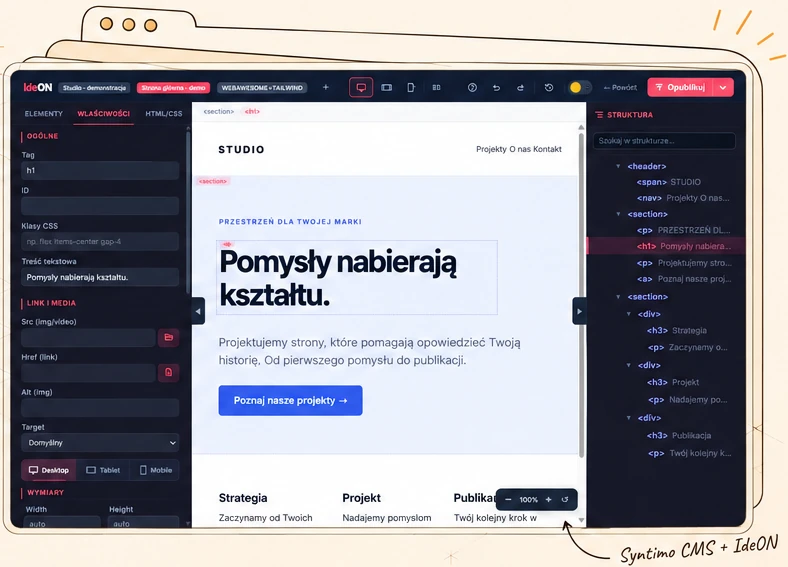
Syntimo CMS + IdeON · actual editor with a demo project
02 / PRODUCT FEATURES

From idea to publication.

Syntimo.com runs on Syntimo CMS. A practical use of the system we are developing.

Content and media

Pages, articles, categories, tags, images and files. One place to work on your website.

IdeON — visual editing

Work on the design and structure of your website. Preview the result before publishing.

Publication control

Drafts, editorial review, publication and previous versions help keep the process organised.

Team and permissions

Separate editor and administrator responsibilities. Decide who can edit, publish and manage the website.

Built-in SEO

SEO titles and descriptions, sitemaps, robots.txt and redirects support organised website growth.

Plugin marketplace

Browse the catalogue and manage extensions. Add capabilities as your needs change.

Simple localisation

Languages and translations in the panel, missing-entry detection, and entry import and export.

Newsletter

Sign-ups, email confirmations, unsubscribes and subscriber status management within the CMS.

Website and admin themes

The theme builder lets you customise your website and administration panel independently.

FIND YOUR USE CASE

Designed for your business.

  • Company and product websites
  • Portals and editorial teams
  • Agencies and website creators
ONE PANEL · MORE POSSIBILITIES

Build your website.
Take care of everything around it.

Design is the beginning. Syntimo CMS brings together tools for translation, discoverability, website growth and editorial work in one environment.

01

Localisation without searching through files

Add a language and manage translations in the panel. Compare language versions, filter missing entries and use import and export. Keep your website, admin interface and supported plugins consistent across languages.

02

A marketplace for plugins

Browse the extension catalogue and manage plugins from the CMS. ZIP package installation and tools to enable or disable features let you adapt your website without rebuilding the whole system.

03

Built-in SEO tools

Set SEO titles and descriptions for pages and posts. Sitemaps, robots.txt and redirect management help organise search engine access to your content, including after URL changes.

04

Newsletter and subscriber management

Collect sign-ups with email confirmation and unsubscribe support. Review subscriber statuses in the panel and keep your list of people who want to hear from your brand organised.

05

Website theme builder

Choose colours, typography and element settings within a shared theme. Build a consistent website design and develop it alongside your IdeON project, without adjusting every page separately.

06

Your own admin panel theme

Customise your team’s everyday workspace too. A separate administration theme lets you set panel colours, fonts and branding independently of the public website design.

07

Blog and editorial workflow

Pages, articles, categories and tags each have their place. Drafts, scheduled publication and version history help you prepare content and maintain a regular publishing rhythm.

08

Media library

Keep images and files close at hand while creating content. A shared library helps reuse assets across publications and reduces time spent searching outside the system.

09

Team, roles and permissions

Decide who creates content, who publishes it and who manages settings and plugins. Permissions define access to tools so each person can work within their responsibilities.

Tool availability depends on the release, active modules and permissions. Newsletter confirmations require configured email delivery; available extensions depend on the marketplace catalogue and installation compatibility.

IDEON · VISUAL WEBSITE DESIGN

Design freely.
Publish with confidence.

IdeON combines visual work with release versioning. Designers see the page, editors manage content and administrators retain publication control.

See each element in context

Select a heading or section, open its properties and check its position in the page structure. Spend less time finding settings and more time creating.

Consistency across your project

Themes, type scales, colours, spacing and presets help maintain a consistent visual language throughout the project.

Drafts separated from releases

Prepare drafts and check the result before publishing. Staging and production environments separate testing from release.

Return to a previous version

Release history and rollback make it easier to restore an earlier state without rebuilding the page manually.

A portable project

Project package import and export include markup, the theme and version metadata. A checksum helps verify the artifact’s integrity.

CMS and editor in one workflow

Content, media, design and publication stay in one environment. This helps organise websites developed by several people.

  1. 01

    Prepare a draft

    Arrange the page and add your content.

  2. 02

    Check the result

    Preview, structure and project quality checks.

  3. 03

    Release a version

    Publish the selected artifact to the target environment.

  4. 04

    Keep improving

    Retain history and the option to roll back.

TECHNOLOGY STACK

A modern foundation.
Room to grow.

Technologies chosen for administration, content and custom modules. This is the current Syntimo CMS stack.

Server layer

PHP 8.4+

Typed application code and business process logic.

Application core

Laravel 12

Routing, validation, authorisation, jobs and integrations in a structured framework.

Administration and interactions

Filament 5 + Livewire 4

Forms, tables and editorial operations without building every view from scratch.

Interface layer

Vite 7 + Tailwind CSS 4

Asset building and a shared styling system.

Syntimo.com environment

MySQL + Nginx / PHP-FPM

A separate CMS installation and database on a VPS.

Extending capabilities

Modules + IdeON

Custom features and a visual editor built around the CMS core.

Versions based on project dependencies, October 2026. Hosting, integrations and configuration are chosen for each deployment. A framework does not replace maintenance, updates or backups.

WORDPRESS VS SYNTIMOCMS · MIGRATION CASE STUDY

The same design.
Less waiting, less data.

We measured namir.design after moving it from WordPress to SyntimoCMS. Compare both implementations, from content rendering speed to downloaded data.

01 / FEWER DOWNLOADS−40%

A lighter website on mobile

Lower transfer means less data to download on the first visit.

02 / CONTENT SOONER−19.5%

Less waiting for the main content

The largest content element appeared sooner in the aggregate mobile measurement.

03 / FEWER SCRIPTS−94%

Less JavaScript to download

Less script data and shorter main thread blocking in this sample.

SyntimoCMS performs well.
Without compromising the design.

A well optimised WordPress website is a useful reference. In the namir.design migration, SyntimoCMS combined less transferred data and faster main content rendering while preserving the website design.

Aggregate results

Averages of medians · 100 Lighthouse measurements · 17 October 2026

WordPress SyntimoCMS

Mobile65.8 → 87.0 / 100

Performance

A higher score is better.

WordPress65.8 points
SyntimoCMS87.0 points

Largest content element · LCP

A shorter time is better.

WordPress4.51 s
SyntimoCMS3.64 s

Data downloaded by the browser

Less transferred data is better.

WordPress927 KiB
SyntimoCMS556 KiB

Downloaded JavaScript

Less script data is better.

WordPress462.2 KiB
SyntimoCMS27.8 KiB
Desktop92.6 → 97.0 / 100

Performance

A higher score is better.

WordPress92.6 points
SyntimoCMS97.0 points

Largest content element · LCP

A shorter time is better.

WordPress1.05 s
SyntimoCMS0.79 s

Data downloaded by the browser

Less transferred data is better.

WordPress1141 KiB
SyntimoCMS749 KiB

Downloaded JavaScript

Less script data is better.

WordPress462.2 KiB
SyntimoCMS27.8 KiB
SEPARATE HTTP MEASUREMENT · 70 RUNS

The server responded sooner

TTFB: 960 ms → 249 ms. This is the wait for the first byte, including the connection.

−74.1%time to first byte
ADDITIONAL GOOGLE TEST

PageSpeed Insights

Performance · homepage · 17 October 2026

A separate measurement in Google’s environment: one run per system and profile. A higher score is better. These scores are not combined with the averages above.

Scope: WordPress on its existing hosting and SyntimoCMS on a VPS. Results also reflect plugins, caching, integrations and hosting. They describe this migration.

How we measured and what to consider

Five equally weighted pages; the median of five Lighthouse runs for each page, profile and system. Displayed values are averages of those medians. Performance is an aggregate indicator, not an official score for the entire website. Contact was excluded because email delivery and the actual CAPTCHA are unavailable in the preview.

Cold browser cache; server caches were not cleared. Lighthouse 13.5.0, Chromium 145. Mobile: 412 × 823, simulated 4G and CPU ×4; desktop: 1350 × 940, desktop preset. KiB = 1024 bytes. TTFB: median of seven HTTP runs per page and system, then the average across five pages.

First content (FCP) appeared later in SyntimoCMS. We did not remove worse runs. Across the series, SyntimoCMS had a higher median Performance in 10 of 10 cases and a lower median LCP in 9 of 10. Statistical significance was not assessed.

Additional laboratory results
Metric and profileWordPressSyntimoCMS
Mobile · FCP — first content1.96 s2.39 s
Mobile · TBT — thread blocking468.0 ms41.5 ms
Mobile · CLS — layout shifts0.0160.006
Mobile · Runs with CLS > 0.12 / 251 / 25
Desktop · FCP — first content0.48 s0.50 s
Desktop · TBT — thread blocking4.0 ms0.0 ms
Desktop · CLS — layout shifts0.1270.078
Desktop · Runs with CLS > 0.115 / 2511 / 25

PageSpeed Insights: Lighthouse 13.5.0, Chromium 153, 17 October 2026, around 03:17 CEST. Neither report contains real user data. These laboratory results can vary and do not establish field Core Web Vitals. TBT does not replace INP.

In both PageSpeed profiles: Accessibility 100/100 and Best Practices 100/100 for both systems. SEO: WordPress 92/100, SyntimoCMS preview 61/100. The preview intentionally blocks indexing; both reports flag a missing meta description. The preview SEO score is not a comparison of CMS capabilities.

Numerical data and sources JSON ↗ · About PageSpeed Insights measurements ↗

CHOOSE A SYSTEM FOR YOUR PROJECT

Syntimo CMS, WordPress
or Drupal?

Your workflow and deployment scope matter. We compare approaches without performance scores or promises of universal superiority.

Comparing editing and publication approaches
AreaSyntimo CMS + IdeONWordPressDrupal
Page editingContent administration and IdeON: elements, properties and project structure.Block editor; with a block theme, the Site Editor also covers templates and styles.Structured content and site configuration; how views are built depends on the deployment.
Versions and publicationDrafts, content versions and IdeON releases with staging/production, export and rollback.Content revisions and publishing permissions; additional processes depend on configuration and extensions.Revisions and core Workflows and Content Moderation modules for modelling publication processes.
TeamworkCMS roles and permissions, with a shared workflow for content and design.Roles and capabilities; extending permissions depends on project needs.Roles, permissions and configurable content state transitions.
Reasons to chooseCustom development on Laravel and CMS integration with IdeON in one environment.An established block approach and an ecosystem of themes and plugins.Advanced content modelling and configurable editorial workflows.

The final row assesses suitability, not benchmark performance. Scope depends on version, modules and deployment. Sources: WordPress Site Editor, revisions, roles and permissions, Drupal Content Moderation. Comparison as of October 2026.

SEE THE ACTUAL INTERFACE

This is what working in IdeON looks like.

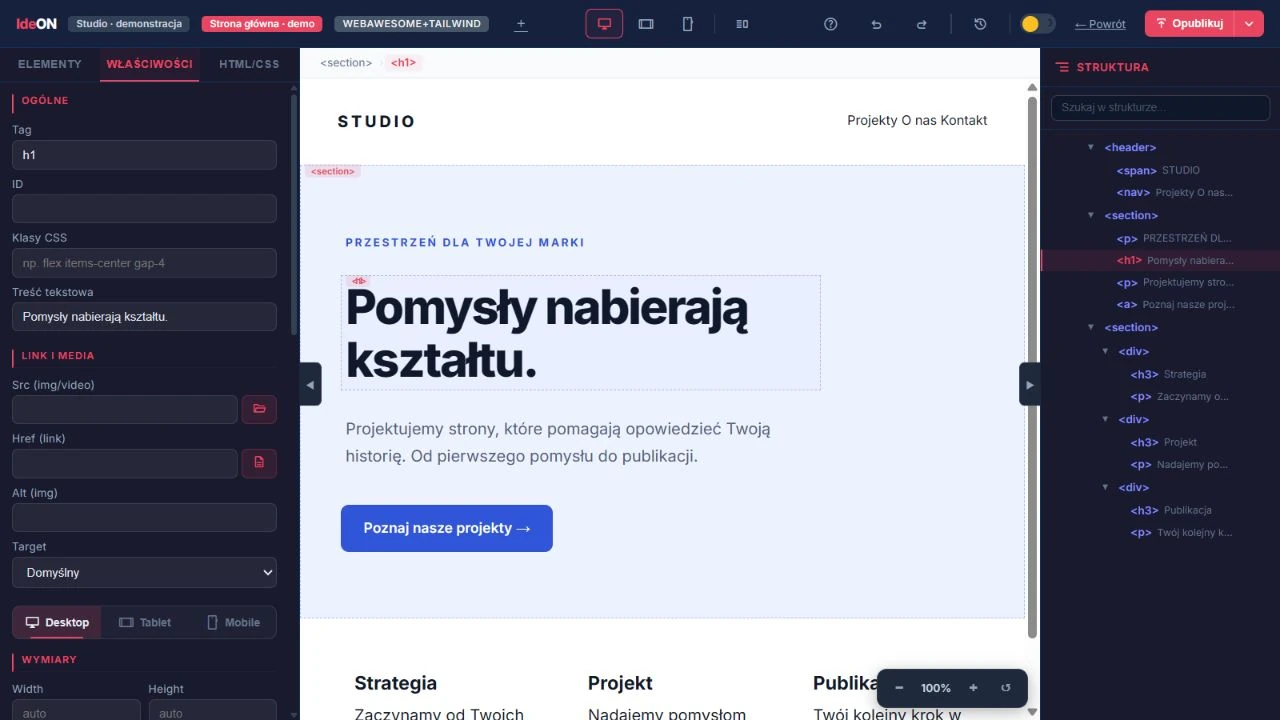
A selected heading, its properties and the page structure. The actual editor below shows a sample studio website.

Actual IdeON editor: studio website, selected heading, properties panel and element tree.
IdeON — visual editingDemo environment · October 2026
GOOD TO KNOW

Before your next step.

How can I get started?+

Contact us and describe your project. We will discuss your needs and deployment options. This page does not list universal prices.

Do the products share an account and integrations?+

Syntimo is a shared brand and development direction. This does not automatically mean a single account, shared data or ready-made integrations across all apps. These capabilities must be confirmed for each product.

Does the interface show a finished product?+

These are authentic screenshots of the working app with demo content, captured in October 2026. Appearance and available features may change with product development and account configuration. The captured interface is in Polish.

LET’S START A CONVERSATION

Your needs.
Our next step.

Tell us what you want to organise, create or develop.

Let’s talk

Interface preview